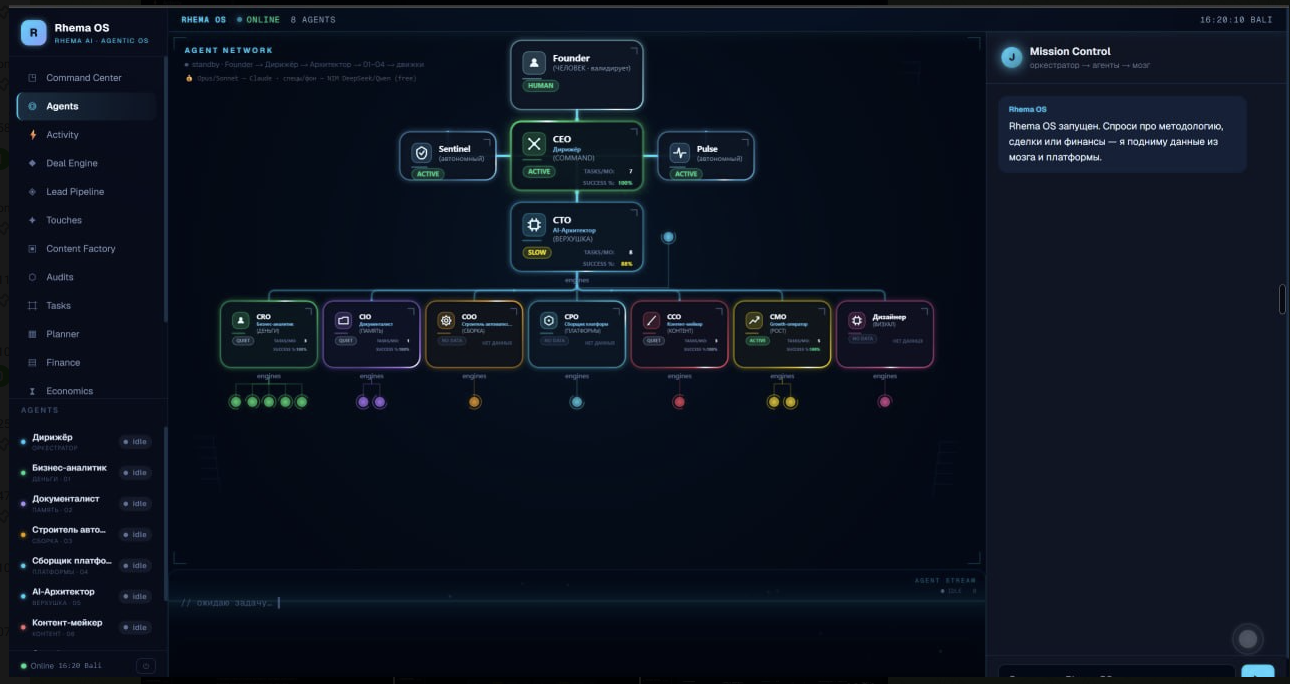
01Command Center / Agents
A command centre and a team of agents
An overview of leads, tasks and business figures. The agent map shows roles and their connections: founder, coordinating agent, AI architect and agents for individual functions. The same workspace provides a place to assign a task and check its status.
02Lead Pipeline / Deal Engine / Coaching
Sales, from a new lead to call review
The customer records system (CRM) shows each enquiry and its current stage. Call analysis accepts text or audio to help identify the client context and prepare material for the next step. A separate view brings together call reviews and recommendations for improving the sales conversation.
03Touches
The next conversation with a prospect
Planned contacts, company context and draft messages appear in one list. A team member reviews the text, uses it in the conversation and records the outcome: message sent, connection accepted or reply received.
04Content Factory
Content, from an idea to approval
A workspace for topics, observations about content in the market and publication drafts. An idea can become a draft carousel for review, approval or rejection. Content preparation and editorial decisions are part of the same visible process.
05Audits / Market Intelligence
Market research to guide the next project
Agents help review company websites and gather observations about processes that could benefit from automation. Findings are grouped by industry, business task and possible solution. The team checks this material before deciding where to focus its work.
06Activity / History
Visibility into agent activity
The activity log displays completed tasks, errors, the amount of text processed and running costs. History retains call reviews and business analyses. The team can revisit a result, understand what happened and identify where human review is needed.