
01
Multiple brands in one workspace
Selecting a brand sets the context for the content. The team can switch between projects without leaving the app.
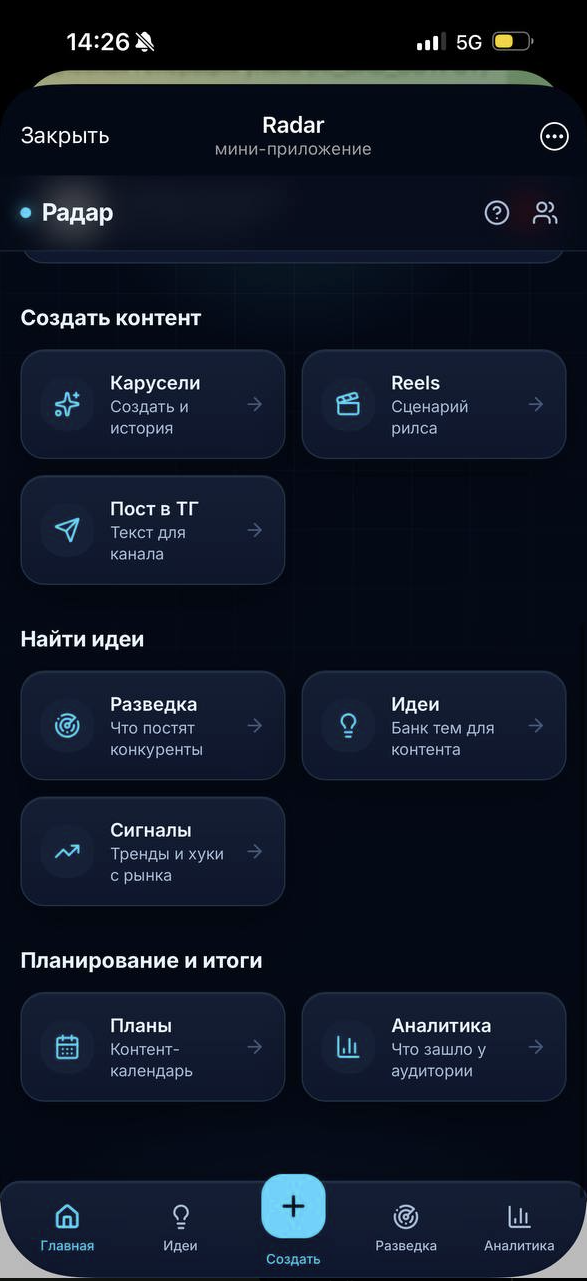
One workspace to explore competitors’ posts, choose a topic, prepare content in a brand’s style and review results after publication.
Business owners and small teams continually need fresh topics and a useful way to present them. Competitor examples, notes, drafts and plans end up scattered across tools. Managing multiple brands also requires keeping their styles distinct.
We built Radar inside Telegram. The team selects a brand, collects reference posts, saves ideas and moves into preparing a carousel, a short-video script or a channel post. Planning and metrics sit alongside content preparation.
Choose a section to explore its purpose and interface. The original product is in Russian.
Selecting a brand sets the context for the content. The team can switch between projects without leaving the app.
Add Telegram channels or paste posts manually. Research helps identify topics and angles to develop in the brand’s own content.
Topics are saved with statuses. An idea can become a carousel, a Reels script or a Telegram channel post.
A content calendar and analytics section support the workflow. Reach and enquiries are entered manually to review published content.
Select the project, audience and format, then add sources to explore.
Choose a useful idea and move into preparing the appropriate content format.
After preparing and publishing the material, return to the plan and enter metrics to understand which topics to develop further.
Radar suits business owners, marketers and agencies preparing regular content for one or several projects. The analytics screen shown has no recorded metrics yet: it demonstrates the interface, not evidence of increased reach or sales.
Project you are exploring: Radar
Its name is already in the form. Tell us what you would like to adapt.
Leave your contact details. We will arrange a call, review how you work and suggest a useful first step. If you want us to build it, we will discuss the scope, price and timing on the call.
Message us on Telegram $0 · No obligation to buy development.